What is WebAssembly and how it runs games and heavy apps in the browser
How WebAssembly brings games, editors and heavy programs to the browser, and what it does not solve.
6 min read
- technology
- performance
- kastavo

For a long time, the browser was a place for light things: pages, forms, a few effects. Today you can open a design editor, a 3D map or a full game without installing anything. A big part of that is only possible because of WebAssembly, or Wasm, a technology that lets the browser run heavy code almost as if it were an installed program.
What is WebAssembly, without the jargon
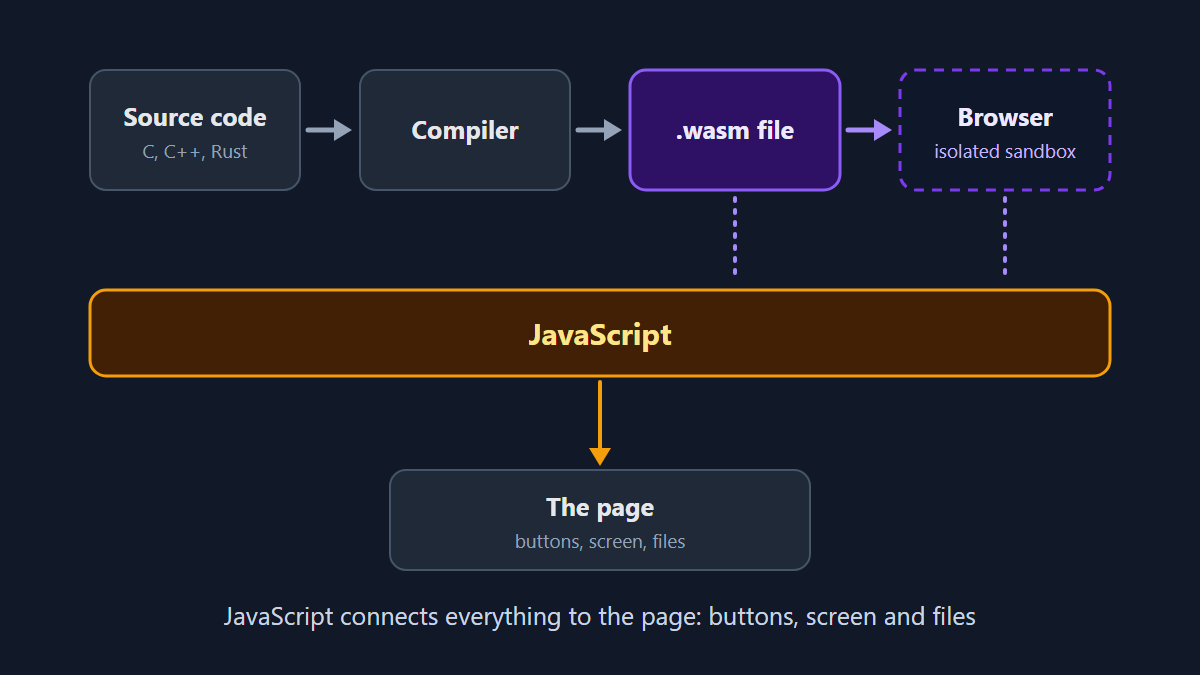
The browser understands JavaScript out of the box. WebAssembly is a second format: a compact binary file, designed to run with high performance. The path is simple:
- Someone writes the program in a language such as C, C++ or Rust
- A compiler turns that code into a
.wasmfile - The browser downloads the file and runs it inside an isolated area, the sandbox
- JavaScript connects that file to the page: buttons, screen, files you choose
That is why WebAssembly does not replace JavaScript. The two work together: JavaScript takes care of the interface and Wasm does the heavy lifting. It became an official W3C standard in December 2019 and keeps evolving: version 3.0, completed in 2025, raised the memory limit and made it easier to compile languages such as Java, Kotlin and Dart.
Games: from professional engines to resurrected Flash
This is where WebAssembly draws the most attention. Unity compiles the engine's own code, written in C and C++, to WebAssembly, and converts the game's C# scripts into C++ through a technology called IL2CPP, before compiling them to the same target. Godot also exports games to the web using WebAssembly.
There is a more nostalgic use too: Ruffle, a Flash emulator written in Rust that runs in the browser with WebAssembly. Adobe ended support for Flash Player on December 31, 2020 and, in January 2021, started blocking Flash content from running, with no more security updates. The emulator lets you open old games and animations without a plugin.
And outside games?
The pattern repeats: large programs, often with years of C or C++ code, get a browser version without having to be rewritten from scratch.
- Design and editing: Figma, whose code is written in C++, moved to running on WebAssembly and reported a load time more than three times faster. Adobe also brought a good part of Photoshop to the web by compiling the C++ code it already had.
- Maps and engineering: Google Earth reached more browsers thanks to WebAssembly, and AutoCAD brought a code base more than 30 years old to the browser.
- Media: FFmpeg, the well-known video and audio library, has a WebAssembly and JavaScript version that converts video right in the browser. Squoosh, Google's image compression app, uses codecs compiled to WebAssembly.
- Data and languages: the SQLite database and Python (through Pyodide) were also compiled to run in the browser.
Speed and privacy: what WebAssembly changes and what it does not
When the heavy work runs on your device, the tool responds without waiting for a server, and the file does not need to leave your computer. But it helps to separate the two things: WebAssembly alone does not guarantee privacy. It runs isolated and does not access files or the network on its own, only through what the page's JavaScript allows. And the JavaScript on the same page can, in fact, send a file to a server. Privacy comes from how the site was built, not from the technology.
That is why it is worth testing instead of trusting a generic promise. Open the browser's developer tools, go to the Network tab and see whether the file leaves your device. Or load the page, turn off the internet and see whether the tool keeps working. Some modules are only downloaded when you use the tool, not when the page opens: use it once with the internet on before turning it off.
What WebAssembly does not do
- It is not always faster. For handling the page and the ordinary logic of a site, JavaScript is still the right choice. The gain shows up in heavy calculations.
- It is still a niche technology on the web in general. The 2022 Web Almanac report already described it this way, with the benefit concentrated in complex applications with large code bases.
- A Wasm module is still code downloaded from a site. Isolation protects you from buggy or malicious modules (that is one of the standard's security goals), but it does not eliminate every kind of error, and trust in whoever delivers the code is still needed. It is the same reasoning as in our text about supply chain attacks.
And Kastavo?
On Kastavo, the tools run in the browser, and WebAssembly comes in only where the work is heavy enough to pay off: Protect PDF with Password and Remove PDF Password, which use QPDF compiled to WebAssembly, and Extract Text from Image (OCR), which uses Tesseract. Most of the other tools use JavaScript, which is enough for lighter tasks. The choice is technical, not marketing. Privacy comes from the file being processed on your device, and you can check that with the tests in the previous section. To understand that architecture in general, see Why Kastavo has no server.
The lesson that remains
WebAssembly turned the browser into a place where games, editors and tools that once only existed installed can fit. It is a real gain in speed and convenience. But the technology alone does not say what a site does with your data: that depends on how it was built and on your being able to verify it. The useful question is not just "does this run in the browser?" but "what happens to my file while it runs?"
Frequently asked questions
It is a compact code format that the browser runs with high performance. Programs written in languages such as C, C++ and Rust are compiled to it and run inside an isolated area, connected to the page by JavaScript.
No. The two work together: JavaScript handles the interface and the page's ordinary logic, and WebAssembly takes over the heavy calculations. For most sites, JavaScript is still enough.
Yes. Engines such as Unity and Godot export games to the web using WebAssembly, and emulators such as Ruffle run old Flash games. The result depends on the game, the size of the files and the device.
The standard isolates each module: it does not access files or the network on its own and follows the browser's security rules. That does not eliminate errors inside the module itself, and the page's JavaScript can still send data to a server, so trust in the site is still important.